Mach5 Deployment: Node To Pod Mapping
Introduction
This document explains the node to pod mapping in Mach5 deployment system in detail
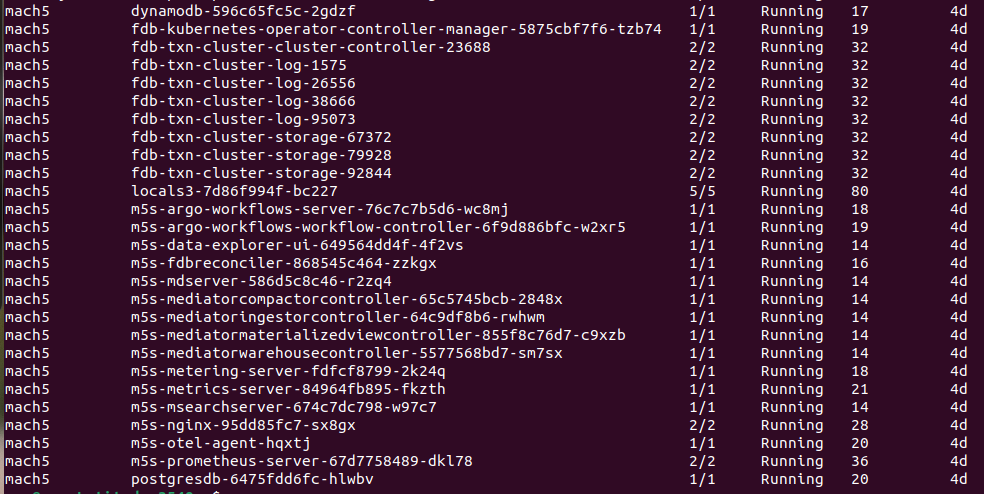
Following image shows the list of different pods in a deployment
Node Setup
Mach5 Search uses node labels for scalability, efficient resource utilization and better performance of different parts of the system. Node label configuration for Mach5 Search:
| Node | Labels | Min # of nodes | Max # of nodes |
|---|---|---|---|
| mach5-main-nodes | mach5-main-role = “true” | 1 | 1 |
| mach5-fdb-nodes | mach5-fdb-role = “true” | 1 | 5 |
| mach5-ingestor-nodes | mach5-ingestor-role = “true” | 0 | 10 |
| mach5-compactor-nodes | mach5-compactor-role = “true” | 0 | 10 |
| mach5-warehouse-nodes | mach5-warehouse-worker-role = “true” | 0 | 10 |
| mach5-warehouse-head-nodes | mach5-warehouse-head-role = “true | 0 | 10 |
Node groups to Pod mapping
Note: otel-agent pod runs on all nodes
| Node Groups | Pods present |
|---|---|
| mach5-main-nodes mach5-main-role = “true” | postgresdb data-explorer-ui mdserver mediatorcompactorcontroller mediatoringestorcontroller mediatormaterializedviewcontroller mediatorwarehousecontroller metering-server metrics-server msearchserver nginx fdbreconciler |
| mach5-fdb-nodes mach5-fdb-role = “true” | fdb-kubernetes-operator-controller-manager-* fdb-txn-cluster-cluster-controller-* fdb-txn-cluster-log-* fdb-txn-cluster-storage-* |
| mach5-ingestor-nodes mach5-ingestor-role = “true” | ip-* and ingestor-* |
| mach5-compactor-nodes mach5-compactor-role = “true” | compact-* |
| mach5-warehouse-nodes mach5-warehouse-worker-role = “true” | warehouse-md-* |
| mach5-warehouse-head-nodes mach5-warehouse-head-role = “true” | warehouse-mdx-* warehouse-ir-* warehouse-os-* warehouse-osd-* |
Note: This is the default Mach5 configuration. It is configurable by updating the values.yaml as needed